Showing posts with label sql server. Show all posts

Saturday, 16 January 2021

Temporary Tables in SQL Server

Temp Table: 

1. Created in Temp database. Can treat as a normal table. 
2. Can be accessible outside the batch.
 
-- check object is exists in tempdb
IF OBJECT_ID('tempdb..#emptemp') IS NOT NULL 
  DROP TABLE #emptemp

CREATE TABLE #emptemp
(  
    empid int,  
    ename varchar(50),   
    address varchar(150)  
)  
GO  -- batch completed
SELECT * FROM #emptemp

INSERT INTO #emptemp VALUES ( 1, 'Scott','Newyork');  
GO  -- batch completed
SELECT * FROM #emptemp


3. Temp tables involves in Transactions, Logging, and Locking.
4. Can create Indexes on Temp tables.
5. Temp tables cannot be passed as parameters to procedures and functions.
6. We can perform schema modification on the Temp table run time.
7. Two types of temporary tables.

7.1. Local Temporary Tables: available in the session where they created. scope of these tables terminates when the session created is closed. Can create the same table in multiple sessions with the same name. 
       
CREATE TABLE #emptemp
(  
    empid int,  
    ename varchar(50),   
    address varchar(150)  
)

7.2. Global Temporary Tables: available for all sessions and all users. Scope of these table ends when the global temp table created session ends.

for example:
in session1 we created the below table, this table can be accessible in other sessions. If session1 terminates, we can not access this global temp table.

CREATE TABLE ##emptemp
(  
    empid int,  
    ename varchar(50),   
    address varchar(150)  
)

8. We cannot access local and global temporary tables in user-defined functions.

Saturday, 2 November 2019

SQL Server - CTE and Recursive CTE

Common Table Expression (CTE): is a temporary named result set. It must be followed by single Select, Insert, Update, Delete statement that references some/all columns defined in the select statement. We can use CTE in CREATE VIEW statement as part of the SELECT Statement.

Order by, into, option clause with query hints cannot be used in CTE query definition.

Example:

with cte as
(
 select * from emp where deptno = 10
)

select * from cte;

Output:


Recursive Common Table Expression: is that references itself. Recursive CTE definition must contain at least two CTE query definitions, an anchor member and a recursive member. Anchor members must combine by one of SET operators (UNION ALL, UNION, INTERSECT or EXPECT). UNION ALL is the only set operator used between the last anchor member and the first recursive member. No of columns and data types in an anchor and recursive members must be the same. 

SELECT DISTINCT, GROUP BY, HAVING, TOP, LEFT, RIGHT, OUTER JOIN, Sub Queries cannot be used in CTE Query definition of a recursive member.

Query to list employees details and their level of reporting using recursive cte.

Example:

with cte as
(select emp.empno,emp.ename,emp.mgr,dept.dname ,0 lvl 
 from emp join dept on emp.deptno = dept.DEPTNO
 where mgr is null
 union all
 select emp.empno,emp.ename,emp.mgr,dept.dname,cte.lvl+1 
 from emp 
 join dept on emp.deptno = dept.deptno 
 join cte  on emp.mgr = cte.empno
)
select * from cte;

Output:


ExampleFollowing query is used to display numbers from 1 to 110 using recursive CTE.

with cte as
(
select 1 lvl 
union all
select c.lvl+1 
from cte c where c.lvl<110
)
select * from cte;


When we run the above query, we will get an error (The statement terminated. The maximum recursion 100 has been exhausted before statement completion). By default, the maximum number of recursion allowed in CTE is 100. To overcome this error we use hint Maxrecursion. This hint specifies the maximum number of recursions allowed by query and the number of recursions is a positive integer between 0 and 32,767. 

Example:

with cte as

(select 1 lvl 
union all
select c.lvl+1 
from cte c where c.lvl<110
  )
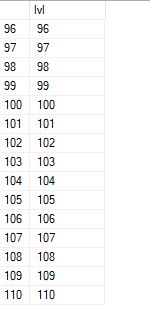
select * from cte option(maxrecursion 110);


Output:
There is a scenario to display numbers up to 40,000. When we use maxrecursion (32767)

Example:

with cte as
(
select 1 lvl 
union all
select c.lvl+1 
from cte c where c.lvl<40000
)
select * from cte 
option (maxrecursion 32767);

Output:


After running the above query, we are getting an error (The statement terminated. The maximum recursion 32767 has been exhausted before statement completion). Because the output result has been crossed the maximum recursive limit of 32767. To overcome the above error, we can use option (maxrecursion 0).

option (maxrecursion 0): When 0 specified no limit is applied for recursion.

Example:
with cte as
(
select 1 lvl 
union all
select c.lvl+1 
from cte c where c.lvl<40000
)
select * from cte option (maxrecursion 0);

Output:


Now we can see the numbers up to 40,000.

Facebook