Tuesday, 27 February 2018

Hive - Analytical Functions

Lets work on emp table.

LAG: Displays preceeding employee number department wise. Default step value is 1. We can change this value by lag(<column>,<n>)

hive> select empno,e.deptno,d.dname,lag(empno) over (partition by e.deptno order by empno) followed_empno from emp e join dept d on e.deptno = d.deptno;


LEAD: Displays following employee number department wise. Default step value is 1. We can change this value by lead(<column>,<n>)

hive> select empno,e.deptno,d.dname,lead(empno) over (partition by e.deptno order by empno) followed_empno from emp e join dept d on e.deptno = d.deptno;


FIRST_VALUE: Returns first value of the window group.

hive>select empno,e.deptno,d.dname,first_value(empno) over (partition by e.deptno ) preceeding_empno from emp e join dept d on e.deptno = d.deptno;


LAST_VALUE: Returns last value of the window group.

hive> select empno,e.deptno,d.dname,last_value(empno) over (partition by e.deptno ) lastvalue from emp e join dept d on e.deptno = d.deptno;


Ranking Functions: These functions are used to find top(n) rows.

1. Row_Number(): Returns sequential number of a row within a partition of the result set without any gap.

hive> select empno,e.deptno,d.dname,e.sal,row_number() over(partition by e.deptno order by sal ) rownum from emp e join dept d on e.deptno = d.deptno;

For empno (7902,7788) salary is same (3000). In general for this scenario, same number should repeat both the records. 


2. Rank(): Returns rank of each row within the partition of a result set. Based on partition condition, it provides rank for each record. For employees (7902,7788) salary is repeated and these records got same rank. But the next record got rank of 14. In general we should get next rank value of 13. For rank 12, we got 2 records. For Rank() we will get the next rank 14 (12+no of same repeated values (i.e 2) ).

hive> select empno,e.deptno,d.dname,e.sal,rank() over( order by sal ) rank from emp e join dept d on e.deptno = d.deptno;


3. Dense_Rank(): We will overcome above problems using this function. Returns rank of rows with in the partition of result set without any gaps. Rank of a row is one plus the number of distinct rank.

hive>select empno,e.deptno,d.dname,e.sal,dense_rank() over( order by sal ) rank from emp e join dept d on e.deptno = d.deptno;


4. Ntile(): Distributes records in an ordered partition into specified no of groups. Groups are started from 1 for each group.

hive>select empno,e.deptno,d.dname,e.sal,ntile(3) over(partition by e.deptno order by sal ) rank from emp e join dept d on e.deptno = d.deptno;


5. Percent_Rank(): Calculates the relative rank of a row within a group of rows. Value between 0 and 1.

hive> select empno,e.deptno,d.dname,e.sal,percent_rank() over(partition by e.deptno order by sal) rank from emp e join dept d on e.deptno = d.deptno;


6. Cume_Dist(): Calculates the cumulative distribution of a value in a group of values.

hive>select empno,e.deptno,d.dname,e.sal,cume_dist() over(partition by e.deptno order by sal ) rank from emp e join dept d on e.deptno = d.deptno;


Sunday, 25 February 2018

Hive - Reading XML data

sample xml file.
Source file: emp.xml

<xml>
<employee>
<id>123</id>
<Name>Test1</Name>
<Branch>ECE</Branch>
  </employee>
<employee>
<id>453</id>
<Name>Test2</Name>
<Branch>EEE</Branch>
  </employee>
<employee>
<id>789</id>
<Name>Test3</Name>
<Branch>CSE</Branch>
  </employee>
<employee>
<id>100</id>
<Name>Test4</Name>
<Branch>IT</Branch>
  </employee>
</xml>


2. copy above jar file in lib of apache home folder in Hadoop.

3. Copy the given xml file to hdfs location. Here i Copied emp.xml file to /hive/externaldata/xml folder.
     hdfs dfs -put /home/emp.xml /hive/externaldata/xml

4. Login Hive, and run following command.

hive> create external table xml_file (id int,
Name string,
Branch string)
ROW FORMAT SERDE 'com.ibm.spss.hive.serde2.xml.XmlSerDe'
WITH SERDEPROPERTIES (
"column.xpath.id"="/employee/id/text()",
"column.xpath.Name"="/employee/Name/text()",
"column.xpath.Branch"="/employee/Branch/text()"
)
STORED AS
INPUTFORMAT 'com.ibm.spss.hive.serde2.xml.XmlInputFormat'
OUTPUTFORMAT 'org.apache.hadoop.hive.ql.io.IgnoreKeyTextOutputFormat'
location '/hive/externaldata/xml/'
TBLPROPERTIES (
"xmlinput.start"="<employee",
"xmlinput.end"="</employee>"
);

5. hive>select * from xml_file;

xml_file.id xml_file.name xml_file.branch
123 Test1 ECE
453 Test2 EEE
789 Test3 CSE
100 Test4 IT


Monday, 6 November 2017

Python - Scrap data from tabular sheet and insert into sqlite3 database.

#Scrap data from tabular sheet and insert into sqlite3 database.
#listing the inserted records to console.

from bs4 import BeautifulSoup
import sys
import requests
from datetime import date
import sqlite3

now = date.today()

startdt = sys.argv[1]
enddt = sys.argv[2]

url = 'coinmarketcap.com/currencies/bitcoin/historical-data/?start='+startdt+'&end='+enddt+''

r  = requests.get("https://" +url)
print(url)
data = r.text
soup = BeautifulSoup(data,"lxml")
table = soup.find("table", { "class" : "table" })
currencytype = soup.find("select",{"class" : "pointer"})
row=table.findAll('tr')
row1 = table.findAll('li')

records = []
count = 0

def writedb():            
    conn = sqlite3.connect('bitcoin.db')
    cursor = conn.cursor()
    #Drop table if already exists in the database.
    cursor.execute('DROP TABLE IF EXISTS bitcoin')
    #create table
    cursor.execute('''CREATE TABLE bitcoin
                 (Date text, Open text, High text, Low text, Close text, Volume text,MarketCap text)''')
    conn.commit()

    #reading tabular data
    for row in table.findAll("tr")[1:]:
        cells = row.findAll("td")
        Date = cells[0].find(text=True)
        Open = cells[1].find(text=True)
        High = cells[2].find(text=True)
        Low = cells[3].find(text=True)
        Close = cells[4].find(text=True)
        Volume = cells[5].find(text=True)
        MarketCap = cells[6].find(text=True)
        record = (Date,Open,High,Low,Close,Volume,MarketCap)
        #insert data to table
        cursor.execute('INSERT INTO bitcoin VALUES (?,?,?,?,?,?,?)', record )
   
    #listing data from tables.
    cursor.execute("SELECT * FROM bitcoin") 
    result = cursor.fetchall() 
    
    for r in result:
        print(r)
                
    print("No of Records:%s"%len(result))    

#calling function
writedb();


#executing the script in command prompt
python e:\learning\python\beautifulsoup_sqlite.py 20160101 20171106

#output

Sunday, 5 November 2017

SQL Server - Extract specific value from string.

Extract specific values from given string.

For example, i have some data as follows in LAB table.

Value
LDL=86
HDL-48  LDL-108
CHO=235  LDL=135  TRI=237
HDL=45  LDL=134  
HDL=82  LDL=99 N
CHO=259  LDL=157  TRI=282
LDL:  123
See scanned report.  CHOLEST: 211  LDL: 211  TRIG: 208  HDL DIR: 56  VLDL: 42

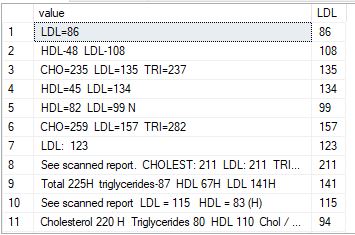
Want to extract only LDL values from above and show it as follows.

LDL=86 86
HDL-48  LDL-108 108
CHO=235  LDL=135  TRI=237 135
HDL=45  LDL=134   134
HDL=82  LDL=99 N 99
CHO=259  LDL=157  TRI=282 157
LDL:  123 123
See scanned report.  CHOLEST: 211  LDL: 211  TRIG: 208  HDL DIR: 56  VLDL: 42 211

Written sample T-SQL code to extract required data. 

Script:

CREATE FUNCTION [dbo].[parseint]
(@string VARCHAR(256))
RETURNS VARCHAR(256)
AS
BEGIN
declare @p_string varchar(256)
set @p_string = substring(@string,CHARINDEX('LDL',replace(upper(@string),'VLDL','VXDL')),len(@string))
DECLARE @isalpha INT
SET @isalpha = PATINDEX('%[^0-9]%', @p_string)
BEGIN
WHILE @isalpha > 0
BEGIN
SET @p_string = STUFF(@p_string, @isalpha, 1, '' )
SET @isalpha = PATINDEX('%[^0-9]%', @p_string )
if @isalpha<>1 
break
END
END
RETURN coalesce(substring(@p_string,1,(case when @isalpha=0 then 3 else (@isalpha-1) end)),0)
END

Calling above function:

SELECT value,
                dbo.parseint(value) as LDL 
FROM dbo.lab

Output:


Saturday, 4 November 2017

Python - using BeautifulSoup4 Scrapping Tabular data, export data to pipe separated text file

Requirement:
Need to scrap the data of crypto currency details for given date ranges. Run time we are passing dates as parameters to the python script. Data is available in Tabular Format.


Code to execute:

# parameters in yyyymmdd format
>>>python beautifulsoup.py 20160101 20171104

Sample Output:


----------------------------------------------------------------------------------------------------------------

Code:

#file name: beautifulsoup.py
from bs4 import BeautifulSoup
import sys
import requests
from datetime import date


now = date.today()

#read run time parameters
startdt = sys.argv[1]
enddt = sys.argv[2]

#Website details
url = 'coinmarketcap.com/currencies/bitcoin/historical-data/?start='+startdt+'&end='+enddt+''

r  = requests.get("https://" +url)
data = r.text
soup = BeautifulSoup(data,"lxml")
table = soup.find("table", { "class" : "table" })
currencytype = soup.find("select",{"class" : "pointer"})
row=table.findAll('tr')
row1 = table.findAll('li')
records = []
count = 0

#code to write data to text file.
def writetext():
    with open('c:\output_%s.txt'%now, 'w') as f:
        f.write("Date".ljust(20,' ')+
                "|Open".ljust(21,' ')+
                "|High".ljust(21,' ')+
                "|Low".ljust(21,' ')+
                "|Close".ljust(21,' ')+
                "|Volume".ljust(21,' ')+
                "|MarketCap".ljust(20,' ')+
                "\n")
        for row in table.findAll("tr")[1:]:
            cells = row.findAll("td")
            Date = cells[0].find(text=True)
            Open = cells[1].find(text=True)
            High = cells[2].find(text=True)
            Low = cells[3].find(text=True)
            Close = cells[4].find(text=True)
            Volume = cells[5].find(text=True)
            MarketCap = cells[6].find(text=True)
            record = (Date,Open,High,Low,Close,Volume,MarketCap)
            f.write("%s|%s|%s|%s|%s|%s|%s \n" % \
                  (Date.ljust(20,' '),
                   Open.ljust(20,' '),
                   High.ljust(20,' '),
                   Low.ljust(20,' '),
                   Close.ljust(20,' '),
                   Volume.ljust(20,' '),
                   MarketCap.ljust(20,' ')
                   )
                  )

#calling function
writetext();


Facebook